
SAP Operation Monitoring Assistant
The SAP Operation Monitoring Assistant keeps an eye on your SAP interfaces. Ask it in plain language what failed, why it failed and how to fix it, in SAP Joule, Microsoft Copilot Studio or any agent that speaks A2A. It reads the facts live from your SAP systems, explains them in the language of the business process, and proposes the fix. With your approval, it also restarts the failed message and tells you how it went.
Formerly the AIF monitoring agent
This is the agent earlier called the AIF monitoring agent, the AIF resolution agent or, on boidra.com, the Interface Remediation Agent. It now covers more than AIF: the confirmed integration landscape, SAP Integration Suite and your own runbooks. Its product page is SAP Operation Monitoring Assistant.
What it helps with
- Failed messages, explained. Find a failed message by its ID, from an error list, or by the business object it belongs to ("sales order 122344"), and get the root cause and the fix steps.
- Fixes that worked before. A proven fix for the same error is answered at once, without a new analysis; fixes of similar errors are offered with the analysis, and what fixed the message is stored for next time. See Known solutions.
- Your day, at a glance. Say "Hello Operation Monitoring" for a short briefing, or ask "What have we got today?" for today's AIF errors, the interfaces with the most of them, and how many errors from earlier days remain.
- Interface health. Error lists, statistics and health checks for a period, an interface or a business object, with a chart in Joule, and a message's log and payload.
- Interfaces and how they are configured. Which interfaces exist for a business topic and how each one is set up.
- AIF terms, and the assistant itself. What an AIF term means, from SAP Help and the AIF guides, and which systems, sources and version the assistant works with.
- Your integration landscape. Partners, message types, where messages go and how current the landscape snapshot is.
- Presentations and documents. An interface overview or a system landscape document as PowerPoint or PDF, ready to download.
- Restarts, only with your approval. Restart one failed message after an explicit "yes", and get the result in the same chat.
- Cancels, only with a reason and your approval. Cancel one failed message for good, after you give the reason and say "yes".
See every skill with prompts you can copy in Skills & example prompts.
Use cases at a glance
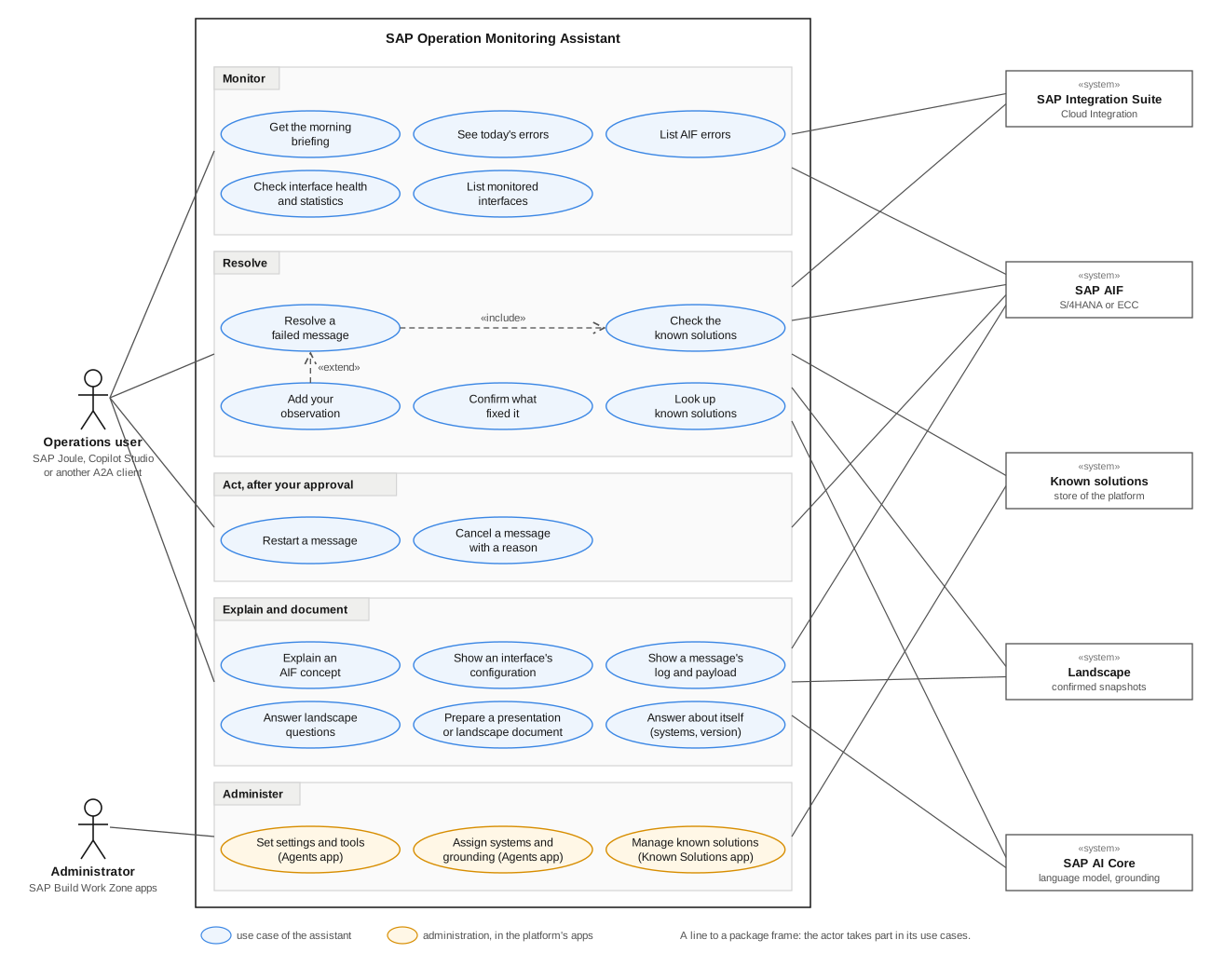
What the assistant does, and with whom, as a UML use case diagram. Click it to open it larger.
Who it is for
| Role | What changes |
|---|---|
| Operations and AMS teams | Less time noticing, finding and investigating failures; more time fixing them. |
| Business users | Ask directly, without transaction codes or a ticket to someone who knows the GUI. |
| Integration specialists | Routine failures are explained for you; your time goes to the cases that need you. |
How it works
- You ask in Joule, Copilot Studio or another A2A client.
- The assistant understands the request and picks the skill that answers it.
- It reads the facts it needs, live, through the SAP operations platform: AIF messages and configuration, the confirmed system landscape from the landscape connector, SAP Integration Suite, your runbooks, and the known solutions: fixes that worked before. What it may read is set per agent in the Agents app.
- It answers in one consistent format: a title, the key facts, tables where they help, the cause and the steps, and a Next suggestion. Anything it could not check is listed under Limitations, never guessed.
The language model runs on SAP AI Core. The assistant connects to the A2A protocol and to SAP Joule without changing anything in your SAP products.
Built to be trusted
- Read first. Answering questions needs no write access. The only actions it takes in SAP are a restart or a cancel, one message at a time, after your explicit approval.
- Evidence, not guesses. Every proposal shows its evidence and sources, and says what it did not check.
- No copy of your business data. Messages and payloads are read from SAP at the moment you ask. Only the integration configuration is kept, as snapshots an administrator confirmed, and the known solutions: the error text, its keys, the root cause and the steps, never payload values.
- Observable. Every request is traced in Boidra Platform, so you see what the assistant did, what it cost and how well it answered. See Traces.
- Stays on topic. It answers SAP operations and interface monitoring questions and politely declines everything else.