
Adoption of SAP Joule: one user across many systems
Boidra Expert9 min read
When an organization adopts SAP Joule, the interesting problem is not the assistant. It is that a single conversation now reaches across systems that have never agreed on who the user is.
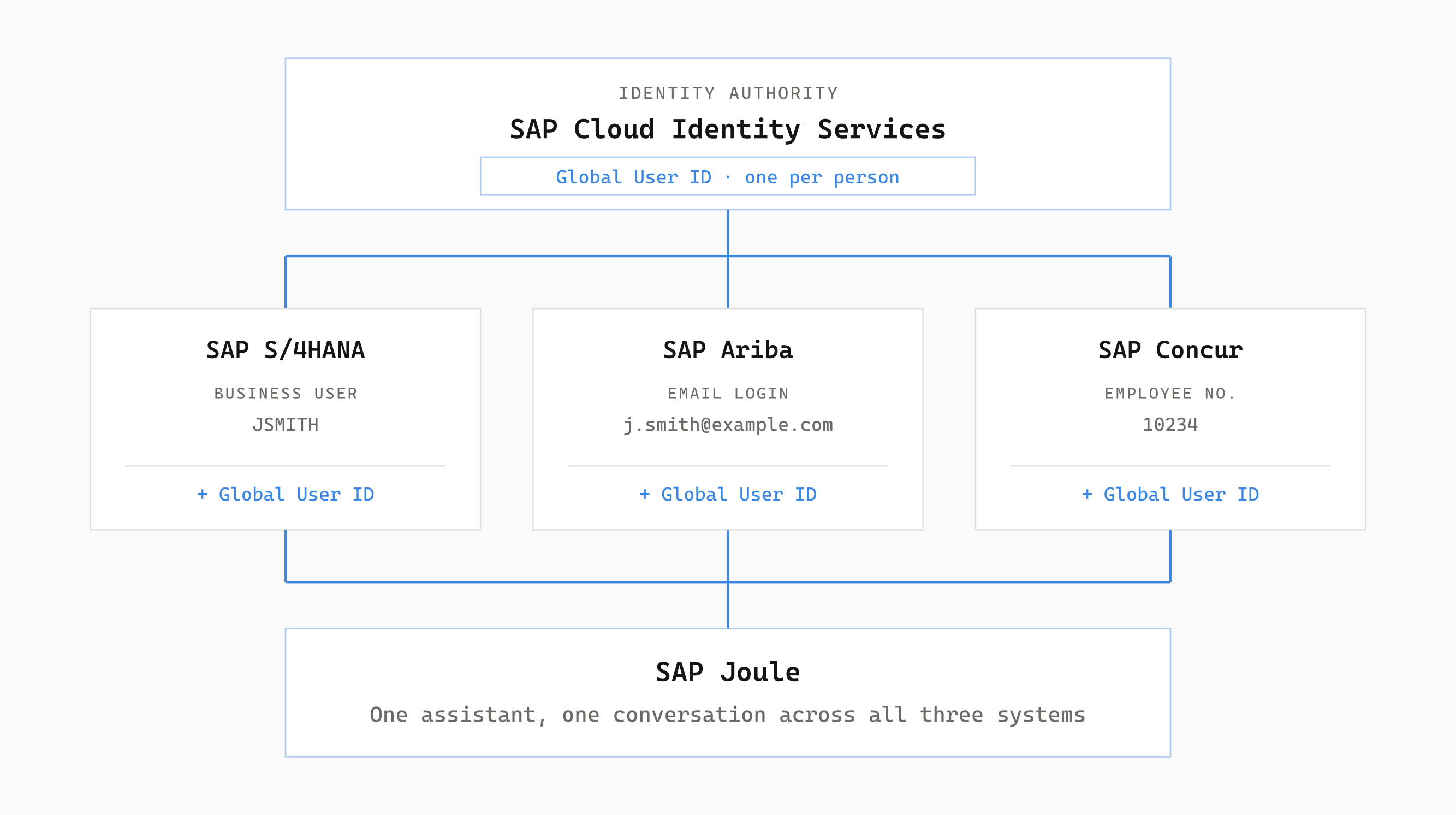
SAP solves this with the Global User ID: one identifier per person, issued by SAP Cloud Identity Services and written into the user record of every connected application. It is what lets Joule treat three different user records as one human being.
The problem adoption surfaces
Each SAP application keeps its own user record, with its own internal identifier:
- SAP S/4HANA knows a user as a business user, for example
JSMITH - SAP Ariba knows the same person by an email-based login
- SAP Concur knows them as an employee number, for example
10234
Nothing in those three values states that they belong to one person. That never mattered while each system was used on its own, with its own login.
An assistant breaks the assumption. The moment a user asks Joule a question that touches two systems, Joule has to know which S/4HANA business user and which Concur employee correspond to the person who just authenticated. Matching on user names does not work: the values differ per system, they change when a user is renamed, and they can collide across tenants.
How Joule actually manages the connection
Three mechanisms work together. They are easy to confuse, and the distinction matters when something goes wrong.
1. The destination: how Joule reaches the system
Every call out of Joule goes through a BTP destination, declared in the capability as a system_alias. The destination holds the URL and the authentication, so credentials never live in the Joule configuration.
The authentication type on that destination decides whether user identity travels at all:
- OAuth2ClientCredentials - Joule calls as the application. No user identity reaches the backend, so the backend cannot apply per-user authorization.
- OAuth2JWTBearer / OAuth2SAMLBearerAssertion - the user's token is exchanged and forwarded. This is what you need when the backend must know which user is asking.
2. Principal propagation: how the system logs the user in
When user identity is forwarded, the receiving system resolves it to a local user and applies that user's roles. SAP S/4HANA has to land on a real ABAP business user before it can authorize anything, and it does that from the name identifier in the token.
3. The Global User ID: how systems agree it is the same person
This is the part that does not replace the other two. It answers a different question.
| Principal propagation user name | Global User ID | |
|---|---|---|
| Scope | one target system | the whole landscape |
| Answers | "which local user am I?" | "is this the same person?" |
| Consumed by | the receiving application, to log in and apply roles | correlation across applications |
| Stable | no, differs per system and can be renamed | yes, by design |
| Grants access | effectively, it resolves to a user with roles | no |
In practice both travel in the same assertion: the name identifier that the destination consumes for login, and the Global User ID as the user_uuid claim alongside it.
For an agent acting on a user's behalf you need both. The Global User ID establishes who consistently across hops; principal propagation ensures each backend enforces that user's own authorizations rather than running as a shared technical user.
What the Global User ID does not do
It grants no permissions. It carries no roles and makes no access decision.
This is the most common misunderstanding. In the common configuration each application still enforces authorization with its own domain-specific roles. The Global User ID only tells that application which local user to evaluate. It is an identifier, not an entitlement.
It is also not validated at runtime. Trust comes from the signed token; the Global User ID is a stored attribute that correlating features read. Nothing checks whether it is "genuine", which is why a wrong or missing value fails silently rather than throwing an error.
Where it comes from
SAP Cloud Identity Services generates it in UUID format for every newly created or provisioned user, and it is then distributed to each connected application. It travels as userUuid in the SAP SCIM extension schema during provisioning, and as the user_uuid claim in the token at runtime.
You can instead let a corporate identity provider own the attribute, choosing which unique user attribute to map. Note that email format is not accepted, precisely because the value has to stay stable when addresses change. SAP's recommendation is to let the Identity Directory own it.
The adoption path: three stages
SAP's reference architecture describes adoption as a progression rather than a switch, and the same identifier plays a different role at each step.
Stage 1 - line-of-business scoped. The managed experience is activated for one application at a time. Each application keeps its own users, and every user is cached in the Identity Directory along with the application's roles replicated as application-groups. Users here are application-owned but consolidatable - that caching is what makes the next stage possible without re-onboarding.
Stage 2 - unified experience, application IAM leading. One Joule experience now spans several applications. SAP Cloud Identity Services unifies authentication and correlates users through the Global User ID, but it is explicitly not the system of record: the source of truth stays distributed, and each application resolves authorization against its own IAM. This is the stage SAP recommends reaching to govern agent and human identities properly.
Stage 3 - SAP Cloud Identity Services centrally leading. The Identity Directory becomes the single source of truth. Authorization assignment is centralized while authorization design stays domain-specific. The Global User ID now anchors one centrally led identity record rather than correlating several. Participating applications deactivate or restrict their local IAM tools, which makes this an operating-model change as much as a technical one. At the time of writing this end-state is exemplified by the SAP-managed Autonomous Suite, which is in Early Adopter Care.
It coexists with your existing IDM
A common objection during adoption: we already have an identity management system, and it owns our people.
That stays true. Adopting the SAP-managed model does not require re-engineering an existing identity landscape. Your IDM remains the system of record for who employees are and what access they receive, and SAP-managed provisioning coexists in the same SAP Cloud Identity Services tenant without overwriting what your IDM governs.
The distinction that makes this safe is between two kinds of groups. IAS user groups are commonly driven from a customer IDM and stay fully under customer control. Application groups express entitlements for Authorization Management and are what the SAP Business AI Platform needs to build the full user-to-authorization picture; in the SAP-managed model these are the groups SAP replicates and maintains.
The boundary is enforced at the Cloud Identity API level, not by convention: the SAP-managed technical user will not manipulate IDM-owned groups, and on user objects may update only link and correlation attributes, never your IDM-owned lifecycle attributes or group memberships.
Follow the architecture, because it moves
This part of SAP's architecture is changing quickly. The staged model comes from reference material describing target states, not a product with a setup wizard. Stage 3's suite is still in Early Adopter Care, the Agent Gateway has been moving through phased availability, and the guidance has shifted more than once during 2026.
Two things follow. Check the revision date on any page you base a design on, and confirm availability for your region and environment rather than in general. And design against the stage you can operate today while keeping the next reachable - the point of the staged model is that Stage 1 users are consolidatable, so a scoped start does not have to be redone.
The decision to get right first
One constraint underpins all of this: Joule requires a single, shared SAP Cloud Identity Services tenant across Joule and every integrated SAP product, with a consistent Global User ID.
Split the tenant and you split the identifier space. A "global" user ID that is only global within half the landscape cannot correlate across the boundary, which undermines both the unified assistant experience and the agent governance built on top of it. This is expensive to retrofit, so it belongs in the design phase.
The provisioning trap worth knowing
Getting the Global User ID into SAP S/4HANA is not a direct push, and the failure is quiet.
With Identity Provisioning you must first provision users from the Local Identity Directory to SAP AS ABAP and then replicate to SAP S/4HANA, because the attribute mapping is handled in the AS ABAP default transformation. With SAP Identity Management you must always run the ABAP or Business Suite initial load job before the SAP S/4HANA one.
Get that order wrong and nothing visibly breaks: users still authenticate, principal propagation still works, the system looks healthy. But the S/4HANA user profile's Global User ID field stays empty and cross-system correlation silently fails. Verify per user in the SAP Cloud Identity Services admin console under User Management, then the user, then Details and Personal Information.
Three questions before adoption
Identity is the unglamorous precondition for everything agentic, and far cheaper to settle before agents exist than after:
- Do all integrated SAP systems share one SAP Cloud Identity Services tenant?
- Is the Global User ID actually populated in the user records of each backend, or still empty?
- When an agent acts on a user's behalf, whose authorizations apply?
For how the assistant layer fits together, see how SAP Joule works and our SAP Joule knowledge guide. If you are connecting your own agents, this identity chain is what sits underneath the A2A Bring Your Own Agent pattern.
Building Joule agents in a landscape where this has to hold up in an audit is what we do. Tell us the use case.
Keep reading
Building SAP AI Agents: Joule Studio SAP-managed and customer-managed BTP explained
When planning an SAP agent, three decisions shape the architecture: where it runs, how it reaches business systems and who may use it. SAP-managed Joule Studio and customer-managed BTP agents compared, with Agent Gateway, A2A, MCP Gateway and what changes for Joule Studio classic.
Connect any agent to SAP Joule with A2A (Bring Your Own Agent)
SAP Joule can talk to agents you build in any framework, over the open A2A protocol. This is the Bring Your Own Agent flow end to end (agent card, BTP destination, Joule dialog function), using our AIF Interface Monitoring agent as the example.